The promise of building apps without code—or budgets—has never been more tangible. A new generation of AI-powered app builders lets you describe what you want in plain language and watch working prototypes materialize in minutes. But when Reddit threads ask "truly free ai app builder?" and landing pages promise "free forever," it's worth asking: which AI can actually build apps for free, and what does "free" really mean?
The promise of building apps without code—or budgets—has never been more tangible. A new generation of AI-powered app builders lets you describe what you want in plain language and watch working prototypes materialize in minutes. But when Reddit threads ask "truly free ai app builder?" and landing pages promise "free forever," it's worth asking: which AI can actually build apps for free, and what does "free" really mean?
From a product development studio perspective, we've evaluated the leading platforms—Replit, Figma Make, Ideavo, Jotform, and others—against real project constraints. Some deliver production-ready applications with generous free tiers. Others offer time-limited trials or prototypes that hit paywalls at deployment. And none replace custom development when you need hardware integrations, enterprise security, or the kind of complexity we've built into projects like Bridge (custom STM32 field nodes with mesh radios) or Helios (AI-powered CRM with custom assistants).
This guide breaks down what free AI app builders actually deliver, where they excel, and when you've outgrown them. Need a production-grade app with custom integrations? Our services are designed for that transition.
What "Free" Really Means in AI App Builders
Not all "free" is created equal. When evaluating which AI can build apps for free, the landscape splits into three tiers:
Free Trials vs. Freemium vs. Open-Source
Free trials give you 7–30 days of full access, then require a paid plan. You can prototype quickly but can't sustain a product without converting to a subscription.
Freemium tiers offer permanent free access with guardrails: compute credits that refresh monthly, storage caps (often 500 MB–1 GB), watermarks on outputs, or restrictions on custom domains and backend integrations. These work for side projects and MVPs but hit limits at scale.
Open-source platforms provide free hosting and deployment with usage-based pricing for resources beyond base quotas. Replit's free tier, for instance, includes hosting and collaboration but charges for always-on deployments and additional compute.
Common Limitations Across Free Tiers
- Export restrictions: Some platforms lock you into their ecosystem with no code export option—your app only runs on their infrastructure.
- Deployment caps: Free tiers may limit you to development environments; production deployment requires upgrading.
- Backend constraints: Custom APIs, database integrations, or third-party service connections often require paid plans.
- Branding and watermarks: Free apps may display platform branding you can't remove.
- Performance throttling: Cold starts, rate limits, and compute quotas affect user experience.
Understanding these boundaries upfront prevents frustration when your prototype is ready to ship. For a deeper dive into specific platforms, check out our free AI app builder comparison.
Top Free AI App Builders Compared
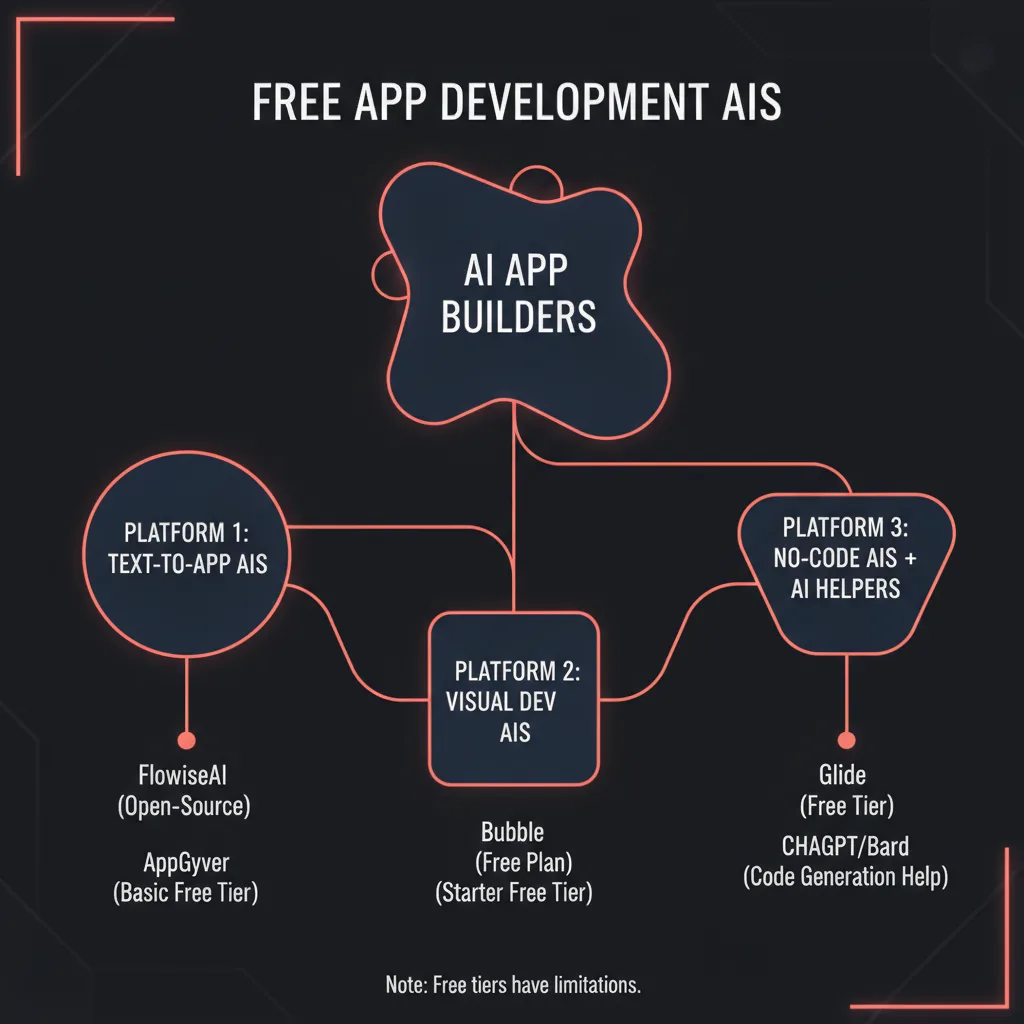
Here's how the leading platforms stack up when you evaluate free tiers through a product development lens:
| Platform | Free Tier Limits | Best For | Code Export | Production-Ready? |
|---|---|---|---|---|
| Replit | Public repls, limited compute credits, community deployment | Full-stack prototypes, learning, collaborative dev | Yes (full source access) | Yes, with usage-based pricing |
| Figma Make | Limited AI generations, Figma ecosystem only | Design validation, prototype handoff to developers | Yes (React, Swift) | No—prototype phase only |
| Ideavo.ai | Generous free tier, no watermarks claimed | Multi-platform MVPs (web, mobile, games) | Limited | Unclear—depends on deployment model |
| Jotform AI | Form-centric apps, Jotform branding | Data collection, surveys, simple workflows | No—Jotform ecosystem | Limited—best for internal tools |
| Onspace | Storage/compute limits, watermarks on free tier | Quick prototypes, landing pages | Limited | No—requires upgrade for production |
| Base44 | Trial or freemium with feature restrictions | Business apps, internal dashboards | No | Requires paid plan |
The key differentiators: Replit offers the most flexibility for developers comfortable with code, while Ideavo targets non-technical users with conversational AI prompts. Figma Make excels at design-first workflows but isn't meant for production deployment. Jotform works if your app is fundamentally a smart form; anything more complex strains the platform.
For a more detailed breakdown, see our guide on the best free AI app builder options available today.
Replit: Free AI-Powered Full-Stack IDE
Replit positions itself as an AI-native development environment rather than a pure no-code builder. You describe what you want—"build a task manager with user authentication and PostgreSQL backend"—and Replit's AI generates working code, sets up the database, and deploys to a live URL.
What Makes Replit Free
Replit's free tier includes unlimited public projects (repls), AI-assisted coding, collaboration tools, and community deployment. You get full source code access, version control via Git, and the ability to invite collaborators. The platform supports Python, JavaScript, Node.js, React, Flask, and dozens of other stacks.
Where You'll Hit Limits
Free deployments are public and sleep after inactivity. Private repls, always-on deployments, custom domains, and increased compute require paid plans starting around $7–20/month. You'll also burn through AI assistant credits faster on complex projects.
Best For
Developers who want AI acceleration but need to see and modify the underlying code. Learning new frameworks. Prototypes that can tolerate public visibility and occasional cold starts.
When to Graduate
When you need private hosting, enterprise security, custom infrastructure (like the hardware integrations in our Bridge project), or guaranteed uptime.
Figma Make: Design-First AI App Prototyping
Figma Make bridges the gap between design and development. You describe an interface—"e-commerce checkout flow with cart and payment"—and the AI generates an interactive Figma prototype. From there, you can refine visually and export React or Swift code.
What Makes It Free
Figma's free tier includes limited AI generations and access to the full Figma design toolset. You can create interactive prototypes, share with stakeholders, and generate code snippets for handoff to developers.
Where You'll Hit Limits
AI generation quotas reset monthly. Code export is starter-quality—developers will need to wire up backends, state management, and production logic. No hosting or deployment is included; Figma delivers designs and component code, not running apps.
Best For
Design validation before committing to development. Creating high-fidelity prototypes for user testing. Generating UI code for developers to integrate into existing projects.
When to Graduate
Immediately, for production deployment. Figma Make is the first step in a design→development pipeline, not a standalone app platform.
Ideavo.ai: Chat-Based Multi-Platform Builder
Ideavo markets itself as "chat with AI, get an app" for web, mobile, games, and internal tools. You describe functionality in conversational prompts, and Ideavo's multi-provider AI (OpenAI, Anthropic, Google) generates the application.
What Makes It Free
The platform claims a generous free tier with no watermarks and support for multiple output formats. You can build and iterate through natural language without writing code.
Where You'll Hit Limits
Deployment details and export options are less transparent than Replit or Figma. It's unclear whether free apps run on Ideavo infrastructure indefinitely or require paid plans for production domains and scaling. Code ownership and export rights need verification before committing to a project.
Best For
Non-technical founders validating MVP ideas quickly. Projects that fit well-trodden patterns (CRUD apps, dashboards, simple mobile interfaces).
When to Graduate
When you need transparent deployment infrastructure, code ownership guarantees, or integrations beyond standard APIs.
Jotform AI App Generator: Forms-to-Apps
Jotform's AI builder generates apps from text descriptions but is fundamentally a form platform. You'll get functional data collection apps—surveys, intake forms, booking systems—but not custom business logic or complex backends.
What Makes It Free
Jotform's free tier includes form creation, basic workflows, and the AI app generator. You can collect and manage data without paying.
Where You'll Hit Limits
Apps are form-centric and branded with Jotform logos. Advanced features—conditional logic, payment integrations, custom branding, more storage—require subscriptions. You can't export code or host elsewhere; your app lives in the Jotform ecosystem.
Best For
Internal tools, data collection, event registrations, simple workflows where forms are the primary interface.
When to Graduate
When your app needs custom logic, third-party integrations, or any functionality beyond smart forms.
When Free AI Builders Work—and When They Don't
Free AI Builders Excel At
MVPs and validation: If you need to test a concept with real users before investing in custom development, free AI builders let you ship in days instead of months. Our services often start with discovery phases that identify whether a prototype or full build makes sense.
Internal tools: Dashboards, admin panels, and workflow automation for small teams don't need production-grade infrastructure. A Replit app or Jotform workflow can run indefinitely on free tiers.
Learning and skill-building: Developers learning new frameworks or founders exploring product development benefit from AI-generated starter code and rapid iteration.
Prototypes for handoff: Design validation in Figma Make or functional prototypes in Replit give development teams a clear starting point, reducing misalignment and rework.
Free AI Builders Hit Walls With
Complex backends and custom logic: When your app needs real-time data processing, custom algorithms, or intricate business rules, no-code platforms constrain you. Projects like ForgeKit—a constructor that generates robot control programs for industrial welding—require low-level control and domain expertise that AI builders can't deliver.
Hardware integrations: If your product involves custom electronics, sensors, or embedded systems (like the STM32 nodes, BLE radios, and GSM modules in Bridge), you need firmware development, PCB design, and integration testing that no-code platforms don't support.
Enterprise security and compliance: GDPR, SOC 2, HIPAA, and other compliance frameworks require infrastructure control, audit trails, and data sovereignty guarantees that free-tier platforms rarely provide. When handling sensitive data, you need to own the stack.
Custom integrations and APIs: Third-party services, legacy system integrations, and custom API endpoints often require paid plans or aren't supported at all. The AI CRM we built in Helios integrates custom assistants, pipeline automation, and client-specific workflows that would be impossible to replicate in a no-code builder.
Performance and scalability: Free tiers often throttle compute, limit concurrent users, and lack auto-scaling. Production apps serving hundreds or thousands of users need infrastructure that won't sleep or rate-limit.
For more context on when to move beyond free tools, explore our AI app development studio (free) guide.
Limitations of Free AI App Builders for Production
Even when free AI builders technically support deployment, several constraints make them impractical for serious products:
Vendor Lock-In and Export Constraints
Platforms that don't provide code export trap you. If the service shuts down, pivots, or raises prices unexpectedly, you have no migration path. Always verify:
- Can you export the full source code?
- Can you self-host the application?
- What data export formats are supported?
Replit and Figma Make score well here; Jotform and some others lock you into their ecosystems.
Data Sovereignty and Compliance
Where does your data live? Who can access it? Free-tier apps often run on shared infrastructure in unspecified regions. If you're handling EU customer data (GDPR), health information (HIPAA), or payment details (PCI DSS), you need documented compliance and data processing agreements—rarely available on free plans.
Performance and Reliability
Free deployments sleep after inactivity (cold starts measured in seconds), throttle under load, and offer no uptime SLAs. Users encountering a sleeping app assume it's broken.
Customization Limits
When your product differentiates on UX details, performance optimizations, or proprietary features, you'll fight platform constraints. AI builders excel at standard patterns; they struggle with the unique.
When to Hire a Studio
You've outgrown free AI builders when:
- Your prototype validated demand and you're ready to ship a production product.
- You need custom hardware integrations, real-time processing, or complex backends.
- Compliance, security, or data sovereignty requirements exceed free-tier capabilities.
- Your competitive advantage depends on features no-code platforms can't deliver.
Our work portfolio shows what's possible beyond no-code: apps with custom firmware, AI systems trained on proprietary data, industrial automation with robot control logic, and enterprise platforms with multi-tenant architectures. When you hit those needs, let's talk.
FAQ: Which AI Can Build Apps for Free
Can AI build a mobile app completely free?
Yes, but with caveats. Platforms like Replit, Ideavo, and Figma Make can generate mobile app code or prototypes without charge. However, deploying to the App Store or Google Play requires an Apple Developer account ($99/year) or Google Play developer account ($25 one-time), plus app signing and backend hosting if your app requires a server.
You can build and test mobile apps for free; distributing them to end users typically incurs costs.
Do free AI app builders require coding?
Most free AI app builders—Ideavo, Jotform, Figma Make—are designed for users with no coding experience. You describe what you want in natural language and the AI generates the application.
Replit is different: it's an AI-assisted IDE that generates code you can see and edit. Non-developers can use it, but comfort with reading code helps. If the AI generates something close but not quite right, you'll need basic programming skills to adjust it.
For maximum flexibility and learning, Replit's approach is superior. For pure no-code, Ideavo and Jotform are simpler starting points.
Can I publish apps built with free AI tools to app stores?
Technically yes, but practically it depends on the platform. Replit gives you full code ownership and export, so you can build native mobile apps and publish to app stores. Figma Make exports UI code that developers integrate into native apps. Ideavo's multi-platform support is advertised but export/deployment processes for app stores aren't clearly documented. Jotform apps are web-based forms and don't translate to native mobile apps for store distribution.
If app store distribution is your goal, confirm code ownership and export options before choosing a platform.
What's the best free AI app builder for beginners?
Jotform is the easiest starting point if your app is fundamentally a form—data collection, surveys, bookings. The interface is intuitive and the AI handles complexity well within its domain.
Ideavo is better for beginners wanting true apps (not forms) without touching code. Conversational prompts feel natural and the platform handles web, mobile, and games.
Replit offers the most power and flexibility but requires some comfort with code. It's the best choice if you're willing to learn as you build.
Figma Make is ideal for designers or visually-oriented founders who want pixel-perfect prototypes before development.
Start with the tool that matches your comfort level. Most founders validating ideas begin with Ideavo or Jotform, then graduate to Replit or custom development as needs grow.
When should I hire a studio instead of using a free AI builder?
Hire a studio when:
1. You've validated your idea and need a production-ready product, not a prototype. 2. Your app requires custom integrations—hardware, legacy systems, proprietary APIs—that no-code platforms don't support. 3. You need performance, security, or compliance guarantees that free tiers can't provide. 4. Your competitive advantage depends on features, UX details, or technical capabilities beyond template-based builders. 5. You're scaling and free-tier limitations—compute, storage, users—are blocking growth.
Free AI builders are excellent for validation and MVPs. When your product's success depends on technical execution, custom development becomes the right investment. Our case studies—Bridge, Helios, ForgeKit—show what's possible when you need more than a no-code platform can deliver.
Key Takeaways: Choosing the Right Free AI App Builder
Free AI app builders have matured to the point where you can ship functional prototypes—and in some cases, production apps—without writing code or spending money. The key is matching the tool to your actual need:
- For rapid MVP validation: Ideavo or Jotform let non-technical founders test ideas in days.
- For developers who want AI acceleration: Replit offers full-stack development with AI assistance and code ownership.
- For design-first workflows: Figma Make generates prototypes and UI code for handoff to development teams.
- For form-centric tools: Jotform dominates data collection and simple workflows.
Every free tier has boundaries. Export constraints, deployment limits, and performance throttles are the norm. Build your MVP on a free platform, validate demand, then graduate to custom development when you need production-grade infrastructure, custom integrations, or features that differentiate your product.
When you're ready to move beyond free builders, LunexLab builds production apps with the performance, security, and custom features that no-code platforms can't deliver. From industrial hardware integrations to AI-powered enterprise systems, we ship products that scale. Let's talk about your project.