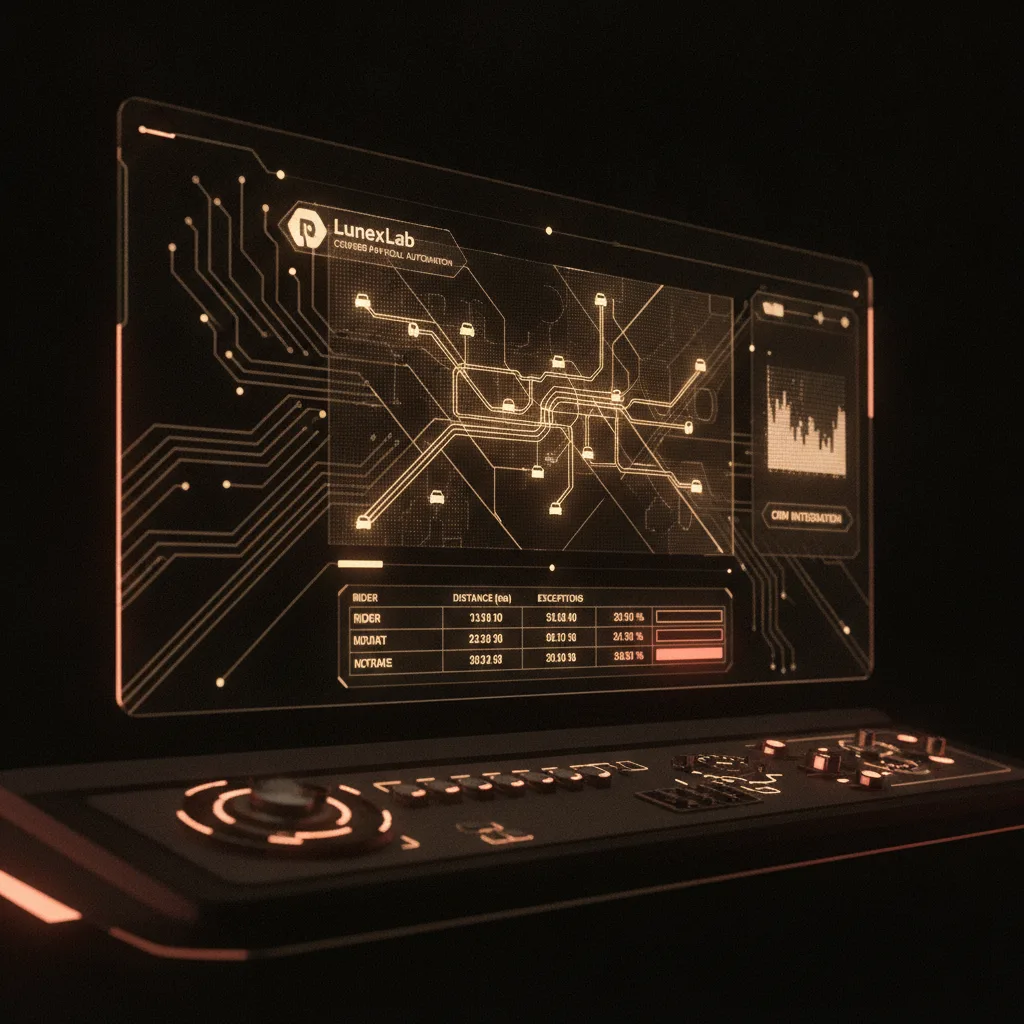
Fleet operators and payroll administrators know the pain: aggregating driver logs, reconciling mileage against route sheets, and catching errors before payroll runs takes hours every pay period. Generic mileage tracker apps like MileIQ or Everlance help individual drivers log trips for tax deductions, but they don't solve the core challenge for courier businesses—integrating dispatch data with payroll automation and detecting exceptions that signal fraud or data entry mistakes.
Courier mileage tracking payroll systems need to do more than record GPS breadcrumbs. They must parse route sheets from your existing CRM or dispatch software, compute accurate per-rider kilometre totals, apply tiered or zone-based pay rates, and flag anomalies—duplicate routes, impossible travel speeds, out-of-zone deliveries—before you cut checks. That's the gap between consumer apps and operations software built for fleet payroll.
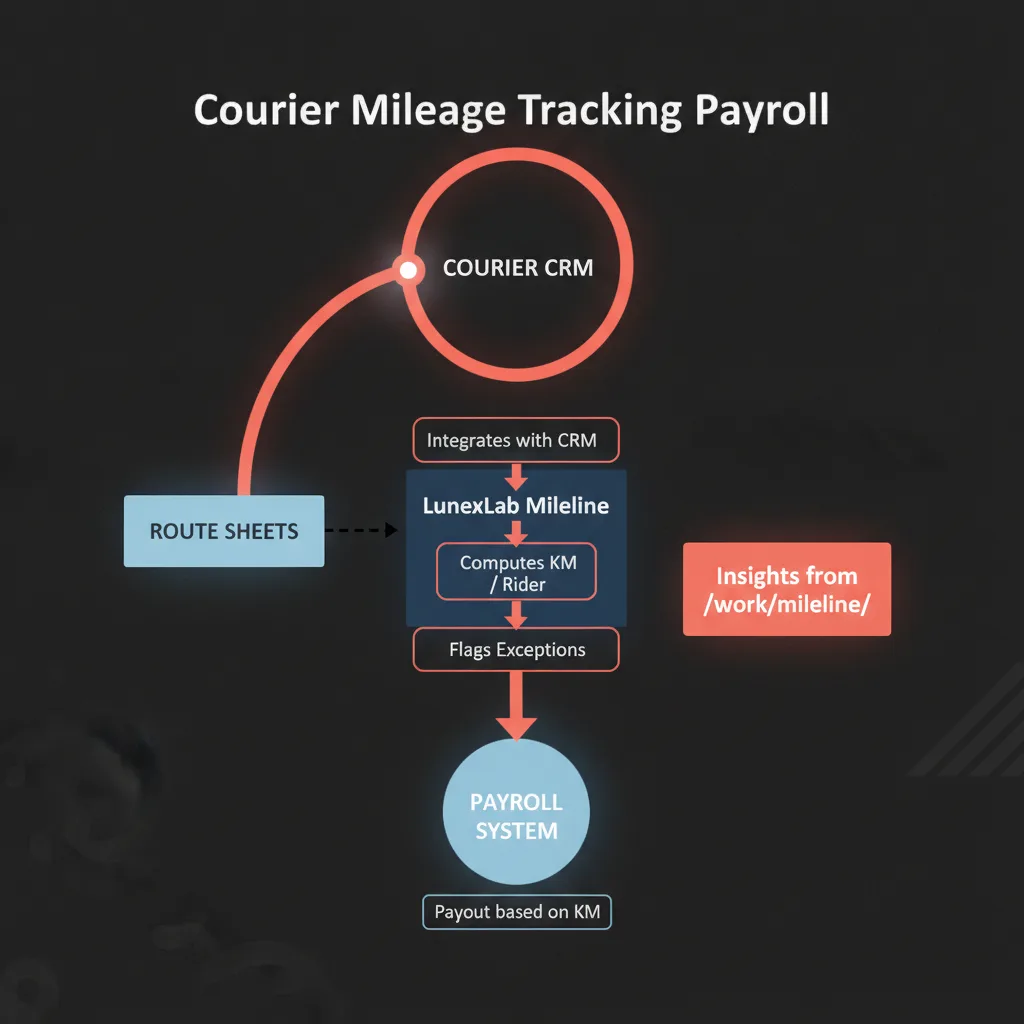
LunexLab Mileline bridges that gap. It integrates directly with courier CRM systems to automate distance calculation from route data, outputs payroll-ready reports, and reduces reconciliation time from hours to minutes. We build operations platforms that integrate with existing systems rather than requiring wholesale replacements—Mileline is a purpose-built payroll connector, not another standalone app for drivers to forget.
Key Takeaways
- CRM-integrated automation: Mileline parses route sheets from your dispatch system—no manual driver logs or spreadsheet exports required.
- Exception detection: Flags duplicate routes, impossible distances, and zone violations to prevent payroll errors and fraud.
- Payroll-ready output: Computes per-rider kilometre totals with configurable tiered or zone-based rates, exported in your payroll format (CSV, API).
- Time savings: Reduce mileage reconciliation from hours to minutes per pay period—saving 70+ hours annually per payroll admin.
---
Why Courier Mileage Tracking Matters for Payroll Accuracy
Accurate mileage tracking is the foundation of fair, compliant courier payroll. When distance logs are incomplete or incorrect, you risk underpaying riders (leading to turnover), overpaying (inflating costs), or failing audits (risking fines for labor law violations). Yet manual reconciliation—the default at many courier operations—is error-prone and time-intensive.
The Cost of Manual Mileage Reconciliation
Payroll administrators typically spend 2–4 hours per week per company aggregating driver logs from paper route sheets, GPS device exports, or driver-submitted odometer readings. At scale—20 riders, 40 routes per day—that's 150+ hours annually per admin just to prepare mileage data for payroll processing.
Manual processes also introduce latency. Drivers submit logs days after shifts, forcing payroll teams to hold pay runs or issue corrections in the next cycle—both of which hurt cash flow and morale.
Common Payroll Errors from Incorrect Distance Logs
The most frequent mileage errors include:
- Duplicate entries: Drivers accidentally log the same route twice, or dispatch systems export duplicate records during shift overlaps.
- Odometer discrepancies: Start/end readings don't match GPS traces, creating disputes over actual distance traveled.
- Out-of-zone trips: Personal errands or off-route detours get billed as delivery mileage, inflating payouts.
- Impossible speeds: GPS errors or timestamp mistakes produce routes claiming 200 km/h travel between stops—obviously incorrect but hard to spot in bulk data.
Without automated exception detection, these errors slip through to payroll, triggering disputes, audit flags, and manual corrections that cost more time than the original reconciliation.
---
How Mileline Automates Courier Mileage Tracking from Route Sheets
LunexLab Mileline is a CRM-integrated payroll connector that automates the entire route-sheet-to-payout pipeline. It's not a driver-facing app; it's back-office software that plugs into your existing dispatch or CRM system, processes route data, and outputs structured payroll reports.
CRM Integration: Parsing Route Data Automatically
Mileline connects to courier CRM platforms (Dispatch Science, Onfleet, or custom dispatch systems) via API or CSV import. It ingests:
- Route assignments: Rider ID, shift start/end times, delivery manifest
- Waypoints: Pickup and drop-off addresses with timestamps
- Distance metadata: Either pre-calculated by the CRM or computed from address geocoding
Mileline maps these inputs to a unified schema, normalizing data across different dispatch systems. This eliminates the manual export/import cycle required by consumer mileage trackers, which force admins to download CSV files from MileIQ or TripLog and paste them into payroll spreadsheets.Per-Rider Kilometre Computation and Totals
Once route data is ingested, Mileline calculates total distance per rider per shift using one of three methods:
1. CRM distance pass-through: If your dispatch system already computes route distances (e.g., optimized routes from a routing engine), Mileline accepts those values directly. 2. Address-to-address geocoding: For systems that log waypoints without distance, Mileline geocodes addresses and computes straight-line or road-network distances using mapping APIs. 3. GPS trace integration: If riders carry GPS devices or use a mobile app that logs breadcrumbs, Mileline can import GPX/KML traces and compute actual driven distance.
The system aggregates totals per rider per pay period, applies configurable rate rules, and outputs itemized summaries showing total kilometres driven, rate tier applied, zone-based adjustments, and gross mileage payout before deductions.
Exception Detection: Flags for Duplicate Routes and Anomalies
Mileline's exception engine scans processed route data for patterns that indicate errors or fraud:
- Duplicate routes: Same origin/destination pair logged multiple times within a short window (e.g., two entries for "Warehouse A → Customer X" within 10 minutes).
- Impossible travel speeds: Distance between waypoints divided by elapsed time exceeds a threshold (default: 120 km/h on highways, 80 km/h in urban zones). This catches GPS glitches and timestamp errors.
- Out-of-zone trips: Deliveries outside the courier's contracted service area or personal trips logged during shift hours.
- Missing waypoints: Routes with fewer stops than the dispatch manifest, suggesting incomplete logging.
Flagged exceptions are surfaced in a review dashboard. Payroll admins can approve, adjust, or reject flagged routes before finalizing the payroll export. This layer of validation prevents both honest mistakes and intentional mileage inflation, reducing dispute rates and audit risk.
---
Mileline vs. Generic Mileage Tracker Apps
Consumer mileage trackers (MileIQ, Everlance, TripLog, Driversnote) dominate search results for "mileage tracking," but they're built for individual drivers logging trips for IRS deductions—not for fleet operators automating courier mileage tracking payroll. The table below highlights the functional gap.
| Feature | Mileline (LunexLab) | MileIQ / Everlance / TripLog |
|---|---|---|
| CRM integration | API/CSV import from dispatch systems | Manual export from driver app |
| Route sheet parsing | Automatic (from CRM waypoints) | None (drivers log trips individually) |
| Exception detection | Flags duplicates, impossible speeds, zone violations | None (individual trip review only) |
| Payroll export format | Configurable (CSV, JSON, API push to payroll system) | Generic CSV export (requires manual mapping) |
| Multi-rider aggregation | Built-in (per-rider totals per pay period) | Manual (admin must merge per-driver CSVs) |
| Rate tiers / zone-based pay | Configurable rules engine (tiered km rates, zone premiums) | Not supported (single rate per driver) |
| Audience | Fleet operators, payroll admins | Individual drivers (gig workers, sales reps) |
When to use a consumer tracker: If you have 1–5 drivers who are self-employed contractors filing their own taxes, apps like MileIQ work fine—they're inexpensive and easy to onboard.
When to use Mileline: If you have 10+ riders on payroll, run structured routes from a dispatch system, and need automated reconciliation with exception detection, a CRM-integrated solution like Mileline eliminates the manual aggregation bottleneck.
---
Key Features of CRM-Integrated Mileage Tracking
CRM-integrated courier payroll automation delivers capabilities that standalone trackers can't match. Here's what to expect from a purpose-built solution.
Automated Distance Calculation from Dispatch Data
Instead of asking drivers to manually start/stop trip tracking, Mileline pulls route assignments directly from your dispatch system. When a rider is assigned "Shift 42: Warehouse → 12 deliveries → return," Mileline already knows the manifest. It computes distance from waypoint sequences, cross-checks against actual GPS traces (if available), and reconciles discrepancies automatically.
This approach eliminates reliance on drivers to remember to log trips, reducing "forgotten mileage" disputes and ensuring every shift is captured.
Zone-Based Validation and Out-of-Bounds Alerts
Courier contracts often define service zones (e.g., "Greater Metro Area" or "Highway 401 corridor"). Mileline supports geofence-based validation: if a rider logs a delivery outside the contracted zone, the system flags it for review. Admins can then approve with notes (legitimate out-of-zone delivery), adjust the rate (apply lower reimbursement for personal trips), or reject the entry entirely.
This prevents personal errands from inflating mileage claims and provides audit documentation for why out-of-zone trips were included or excluded.
Payroll-Ready Reporting (CSV/API Export)
Mileline outputs structured data in formats that integrate directly with payroll systems (ADP, Gusto, QuickBooks, or custom platforms). Export options include:
- CSV with itemized rows: One row per rider per pay period, columns for total km, rate, gross payout, flags.
- JSON API: Push payroll data directly to your HR system via webhook or scheduled sync.
- PDF summaries: Human-readable reports for payroll review meetings or driver disputes.
Configurable field mapping ensures compatibility with your existing payroll schema—no manual copy-paste required.
---
Real-World Use Case: LunexLab Mileline
LunexLab built Mileline for a North American courier operator managing a fleet of 30+ riders across urban and suburban routes. The client's existing workflow relied on paper route sheets and end-of-week odometer reconciliation, which took payroll staff 6–8 hours per week and produced frequent disputes over missing trips.
Mileline integrated with the company's custom dispatch CRM, parsing route assignments and waypoint logs in near-real-time. Key outcomes:
- Reconciliation time collapsed: payroll staff review exceptions instead of reconstructing every sheet.
- Fewer disputes: automated exception detection catches duplicates and impossible jumps before payroll lock.
- Payroll consistency: kilometre rates apply from the same rules, not a monthly lookup.
- Audit compliance: Structured logs with flagged exceptions provided documentation for labor audits, reducing compliance risk.
The deployment used a similar CRM integration architecture to LunexLab's Helios CRM, which connects AI assistants to customer workflows. Mileline applies the same principle—embed automation into existing ops platforms rather than forcing users to switch to a new standalone tool.
For more on our operations software portfolio, visit our work page.
---
Choosing the Right Mileage Tracking Solution for Your Courier Fleet
Selecting between consumer mileage tracker apps and integrated payroll software depends on your fleet size, dispatch infrastructure, and payroll complexity.
When to Use a Consumer Tracker vs. Integrated Payroll Software
Use a consumer app (MileIQ, Everlance) if:
- You have fewer than 10 drivers.
- Drivers are contractors filing their own taxes (you don't process payroll).
- Your dispatch system doesn't support API integrations or structured route exports.
- Manual CSV aggregation is acceptable (one admin can reconcile logs in under 2 hours per pay period).
Use integrated software (like Mileline) if:
- You have 10+ riders on W-2 payroll.
- You run structured routes from a dispatch or CRM system (Onfleet, Dispatch Science, custom platform).
- You need exception detection (fraud prevention, dispute reduction).
- You want payroll-ready output with tiered rates or zone-based pay rules.
- Manual reconciliation takes more than 2 hours per pay period, or you experience frequent payroll disputes.
Questions to Ask Before Implementation
Before committing to a mileage tracking solution, clarify:
1. What data does our dispatch system export? Can it provide route manifests, waypoints, and timestamps via API or CSV? If not, you'll need GPS trace integration or a driver-facing app. 2. How are we currently handling exceptions? Do you have a process for reviewing duplicate trips or out-of-zone deliveries? Automated flagging reduces admin workload. 3. What pay rate structure do we use? Flat per-km rate, tiered (higher pay above X km), or zone-based (premium for express areas)? Ensure the solution supports your rules. 4. Who reviews payroll mileage? If multiple admins handle reconciliation, look for collaborative review tools (e.g., approval workflows, audit logs). 5. Do we need integration with our payroll system? Direct API integration vs. CSV export determines how much manual work remains.
For custom integrations or adaptations of Mileline to your CRM platform, contact LunexLab—we build operations software tailored to logistics and industrial workflows.
---
FAQ: Courier Mileage Tracking & Payroll Automation
How does Mileline integrate with our existing courier CRM?
Mileline connects via API or CSV import to parse route sheets from your dispatch system (e.g., Dispatch Science, Onfleet, or custom CRM). It maps rider IDs, timestamps, and waypoints to compute total kilometres per shift, then outputs payroll-ready reports. If your CRM doesn't have an API, we can build a custom connector or use scheduled CSV imports from your dispatch exports.What types of exceptions does Mileline detect?
Mileline flags duplicate route entries, impossible travel speeds (indicating GPS errors or data entry mistakes), out-of-zone deliveries (trips outside contracted service areas), and missing waypoints (routes with fewer stops than the dispatch manifest). Each flagged exception is surfaced in a review dashboard where admins can approve, adjust, or reject before finalizing payroll—reducing disputes and fraud risk.
Can Mileline handle multiple pay rates based on distance tiers?
Yes. Configure tiered rates (e.g., $0.50/km for 0–50 km, $0.60/km for 50+ km) or zone-based rates (premium pay for express delivery zones). Mileline applies rules per rider and outputs itemized payroll summaries showing which tier or zone rate was used for each shift. This eliminates manual rate lookups and ensures consistent application of your pay policy.
How much time does automated mileage tracking save vs. manual reconciliation?
Fleet operators typically spend 2–4 hours per week per payroll admin aggregating driver logs from paper route sheets or GPS device exports. Mileline reduces this to under 30 minutes for review and approval—saving 70–150 hours annually per admin. This represents a 90%+ reduction in reconciliation time for most courier fleets.
Is Mileline a standalone app or does it require our CRM?
Mileline is a payroll connector, not a driver-facing tracker. It integrates with your existing CRM or dispatch system to automate back-office mileage calculation. Drivers continue using your current route logging process (paper sheets scanned into the CRM, GPS device logs, or mobile app check-ins). Mileline processes that data on the backend, so there's no new app for drivers to learn or forget to use.
---
Get Started with Automated Courier Payroll
Manual mileage reconciliation doesn't scale. When your courier fleet grows beyond a handful of riders, the hours spent aggregating logs, catching errors, and resolving disputes compound quickly. CRM-integrated courier mileage tracking payroll eliminates that bottleneck by automating distance calculation, flagging exceptions, and delivering payroll-ready reports—all without forcing drivers to adopt new apps or workflows.
LunexLab builds operations platforms for logistics, industrial monitoring, and workflow automation. Mileline is one example of how we ship real products that integrate with existing systems rather than requiring wholesale platform replacements. If you're evaluating payroll automation for your courier fleet or need a custom integration for your dispatch CRM, get in touch—we'll help you define requirements and scope a solution that fits your ops infrastructure.
For more on our portfolio of operations software—from structural monitoring hardware to AI-powered CRM—explore our work page.